
Why Your Business Website Keeps Getting Hacked (And How to Stop It)
The Scale of the Problem in 2026
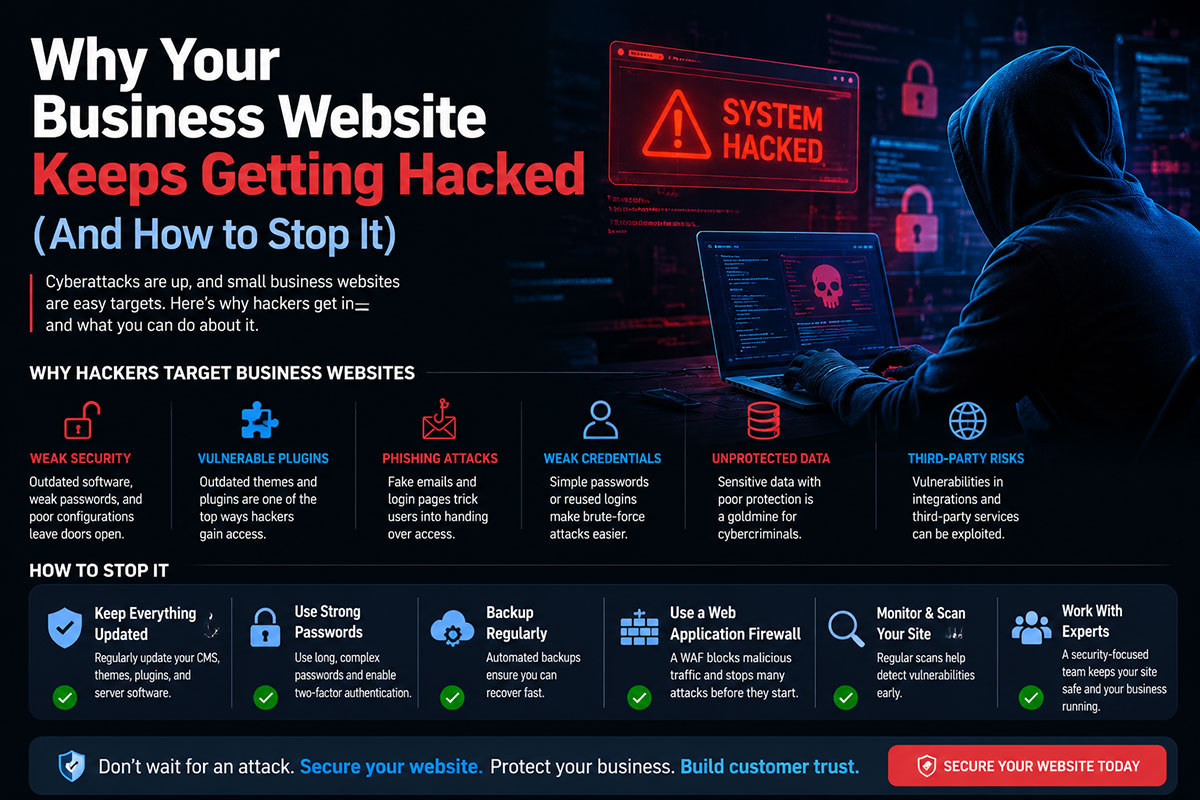
Approximately 30,000 websites are compromised every day. Automated attack tools continuously scan the entire internet for specific, known vulnerabilities. Your website’s size, industry, or traffic volume is irrelevant to these tools. If your website has been hacked more than once, the root cause was almost certainly never properly addressed after the first incident.
The 5 Real Reasons Your Website Keeps Getting Hacked
Reason 1: Outdated CMS, Themes, and Plugins
WordPress powers approximately 43% of all websites on the internet. When a vulnerability is discovered in a popular WordPress plugin, attackers specifically target sites running outdated plugin versions using automated tools that can scan millions of sites in minutes.
Fix: Enable automatic minor updates for WordPress core. Subscribe to security advisories for your installed plugins. Apply critical security patches within 24–48 hours of release.
Reason 2: Weak Passwords and No MFA on Admin Accounts
Credential-based attacks account for a significant proportion of website compromises. WordPress admin accounts at /wp-admin are attacked constantly by automated tools testing millions of username/password combinations per hour.
Fix: Use a password manager to generate a unique, 20+ character random password for every account. Enable two-factor authentication on your WordPress admin account. Change the default admin username away from ‘admin’.
Reason 3: No Web Application Firewall (WAF)
A WAF sits in front of your website and filters malicious traffic before it reaches your server. Adding a WAF is the most impactful single security measure for most small business websites.
Fix: Enable Cloudflare (free tier includes basic WAF protection). For WordPress specifically, Wordfence or Sucuri provide plugin-based WAF. For higher-security requirements, AWS WAF or Imperva provides enterprise-grade protection.
Reason 4: Unencrypted Data and Missing or Misconfigured SSL
In 2026, a website without HTTPS is flagged by every major browser as “Not Secure.” A valid SSL certificate alone is not sufficient — common misconfigurations undermine the protection the certificate is supposed to provide.
Fix: Ensure your SSL certificate is valid, current, and auto-renews. Use SSL Labs (ssllabs.com/ssltest) to test your SSL configuration. Force HTTPS for all traffic using HSTS headers.
Reason 5: Cheap, Insecure Shared Hosting
Shared hosting is the most vulnerable environment for several reasons: a security breach affecting one tenant can compromise other tenants (cross-site contamination), and cheap hosting providers typically invest less in server hardening, monitoring, and incident response.
Fix: Migrate to managed WordPress hosting (Kinsta, WP Engine, Cloudways) or a VPS with dedicated resources. The cost premium over shared hosting is typically ₹1,500–₹5,000 per month.
The Complete Website Protection Checklist
Core Protection
• Enable HTTPS and force HTTPS for all traffic
• Install and configure a WAF (Cloudflare free tier minimum)
• Enable MFA on all admin accounts
• Change default admin username
• Update all CMS, theme, and plugin versions to current
• Set up automatic minor updates
Monitoring and Detection
• Install a security plugin (Wordfence or Sucuri) with file integrity monitoring
• Set up uptime monitoring (UptimeRobot, free)
• Configure security alert emails for failed login attempts and file changes
Recovery Readiness
• Configure automated daily backups stored off-server
• Test restoration at least monthly
• Document your recovery procedure
Frequently Asked Questions
How do I know if my website has been hacked?
Common signs include: website redirecting visitors to unfamiliar sites, Google Search Console showing security warnings, your hosting provider sending a suspension notice, unexpected admin accounts appearing in your CMS, visitors reporting browser warnings, or your website appearing in Google search results with spam content.
How long does website hack recovery take?
Clean recovery from a typical WordPress hack takes 4–8 hours for a competent professional, including identifying and removing malicious files, restoring clean files from backup, auditing and cleaning the database, resetting all credentials, patching the exploited vulnerability, and requesting Google malware review removal.
Will my website get hacked again after it is cleaned?
Only if the root cause is not addressed. Cleaning malware without patching the exploited vulnerability guarantees reinfection — sometimes within hours. Always identify and fix the attack vector as part of recovery.
Does HTTPS protect my website from being hacked?
HTTPS encrypts data in transit — it protects your visitors’ data from interception. It does not protect your website from application-layer attacks (SQL injection, XSS, plugin vulnerabilities). HTTPS is necessary but not sufficient for website security.
How much does NetNovaz charge for a website security audit?
NetNovaz offers a free initial website security assessment covering the most common vulnerability categories. Comprehensive security audits for business-critical websites are priced based on the size and complexity of the site.

)