
How to Build a Disaster Recovery Plan for Your Business (Free Template Included)
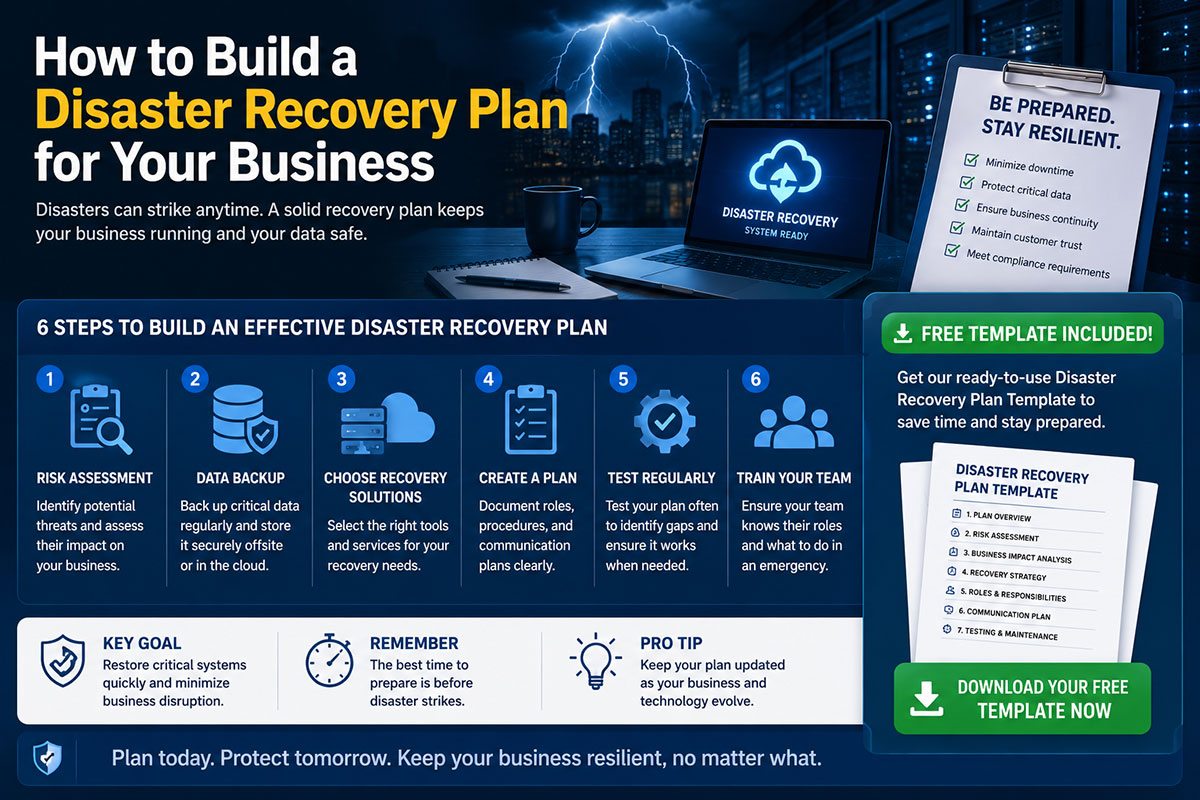
Why Every Business Needs a Disaster Recovery Plan
Research consistently finds that 40–60% of businesses that experience a major IT disaster and do not have a recovery plan fail within twelve months. A disaster recovery plan (DRP) is a documented, tested procedure for restoring your IT systems and business operations after a disruptive event.
Types of Disasters Your Plan Must Cover
• Natural disasters (flood, fire, power outage)
• Cyber incidents (ransomware, data breach, destructive malware)
• Hardware failure (server failure, storage corruption, network equipment failure)
• Human error (accidental deletion, misconfiguration, software update failure)
• Supplier failure (cloud provider outage, ISP outage, critical SaaS platform downtime)
Step 1: Conduct a Business Impact Analysis
A Business Impact Analysis (BIA) identifies which business processes are most critical and what the financial and operational impact of disruption to each process would be over time.
For each critical process, ask:
What IT systems does this process depend on?
What is the maximum acceptable downtime?
How much data can we afford to lose?
Step 2: Define RTOs and RPOs for Each Critical System
Recovery Time Objective (RTO)
RTO is the maximum acceptable time between a disaster occurring and your systems being restored to operational status. Achieving a two-hour RTO requires different infrastructure (hot standby systems, automated failover) than achieving a 24-hour RTO.
Recovery Point Objective (RPO)
RPO is the maximum acceptable amount of data loss measured in time. If your RPO is four hours, your backup system must capture a complete copy of your data at least every four hours. Daily backup provides an RPO of up to 24 hours.
Step 3: Implement Your Backup Strategy — The 3-2-1 Rule
The 3-2-1 backup rule: Three copies of your data. Two different types of storage media. One copy stored off-site or in the cloud.
For most SMBs in 2026: continuous or hourly snapshot backup to a local NAS device, daily replication to a cloud storage service such as AWS S3, Azure Blob Storage, or a dedicated backup SaaS like Veeam or Acronis.
Critically: a backup you have never tested is not a backup. Test your restoration procedure at least quarterly.
Step 4: Define Your Communication Plan
Your communication plan must define:
• An out-of-band communication method for the incident response team
• A clear list of who is notified and in what order
• Pre-written message templates for customer communication
• A designated spokesperson for external communications
Step 5: Test Your Plan with Regular Drills
Conduct a tabletop exercise annually: walk your incident response team through a simulated scenario and identify every decision point where the team is uncertain.
Conduct a technical recovery test annually: actually restore from backup to a test environment and verify that your critical systems come up correctly within your defined RTO.
Frequently Asked Questions
What is the difference between a disaster recovery plan and a business continuity plan?
A DRP focuses specifically on restoring IT systems and data after a disruptive event. A BCP is broader — it covers how the entire business continues to operate during and after a disruption, including people, facilities, and processes. A DRP is typically a component of a larger BCP.
How often should I update my disaster recovery plan?
Review and update your DRP at least annually. Also update it whenever there is a significant change to your IT environment — a new system deployed, a change in hosting provider, or team changes affecting incident response roles.
What is RTO and RPO?
RTO (Recovery Time Objective) is the maximum acceptable time for your systems to be restored after a disaster. RPO (Recovery Point Objective) is the maximum acceptable amount of data loss, measured in time. Together, these parameters define the technical requirements for your backup and recovery infrastructure.
Is cloud backup sufficient for disaster recovery?
Cloud backup is a critical component of disaster recovery but not a complete DR solution on its own. You also need documented recovery procedures, tested restoration processes, communication plans, and ideally cloud-hosted standby environments that can be activated quickly.
Where can I download the free disaster recovery plan template?
NetNovaz’s free disaster recovery plan template is available via the link in the CTA below. It includes a pre-filled structure for BIA, RTO/RPO definitions, backup procedures, communication plans, and test schedules.


)